 By
By 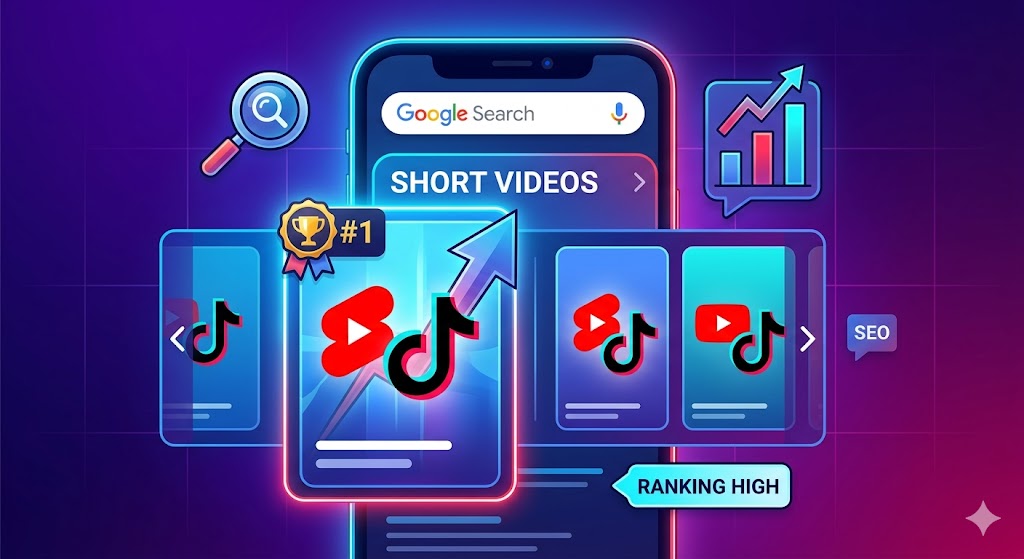
The landscape of search engine optimization (SEO) is undergoing a massive visual revolution. If you look at a Google search engine results page (SERP) today, you will notice a stark difference compared to just a few years ago. Alongside traditional blue links, featured snippets, and image packs, a new powerhouse has emerged: the Short Videos carousel.
Google has recognized that modern users—particularly Gen Z and Millennials—often prefer quick, easily digestible video content over lengthy articles. Whether they are searching for a quick recipe, a tech hack, a makeup tutorial, or a fitness routine, searchers want instant visual gratification.
As a content creator or brand, relying solely on the native algorithms of TikTok or the YouTube Shorts feed is a massive missed opportunity. While going viral on a platform’s “For You” page brings a sudden spike in views, optimizing your short-form videos to rank on Google search provides something much more valuable: consistent, evergreen, high-intent traffic.
In this comprehensive guide, we will break down exactly how Google indexes short-form video, how search intent differs from algorithmic scrolling, and the exact step-by-step strategies you need to employ to rank your TikToks and YouTube Shorts on Google’s front page.
Why Ranking Short-Form Videos on Google Matters
Before diving into the technical strategies, it is crucial to understand why investing time into Google SEO for your short videos is a game-changer for your digital marketing strategy.
The Shelf Life of Content: Algorithms vs. Search Engines
The biggest frustration creators face on platforms like TikTok and Instagram Reels is the notoriously short lifespan of content. You might spend hours scripting, shooting, and editing a 45-second masterpiece. The algorithm picks it up, pushes it to thousands of viewers, and for 48 to 72 hours, the engagement is intoxicating.
But then, the curve flattens. The video is buried beneath millions of newer posts, rarely to be seen again.
Google operates on a fundamentally different premise. Search engines are driven by user intent, not just recency and engagement velocity. If you create a YouTube Short answering the specific question, “How to fix a leaky bathroom faucet,” and optimize it correctly, that video can rank on Google’s front page for years. Every time someone encounters that problem and Googles it, your video is there waiting for them. This creates a compounding effect on your views, brand awareness, and subscriber base.
Tapping into High-Intent Search Traffic
When a user is scrolling their TikTok “For You” page, their primary intent is entertainment or passive discovery. They are leaning back, waiting for the algorithm to serve them something interesting.
When a user types a query into Google, they are leaning forward. They have a specific problem, question, or desire, and they are actively seeking a solution. This is known as high-intent traffic. Capturing an audience at the exact moment they are looking for your specific expertise leads to higher conversion rates, deeper trust, and stronger brand affinity.
The Rise of the “Short Videos” Carousel

Google has actively integrated a dedicated “Short Videos” block into mobile and desktop search results. This carousel pulls directly from platforms like TikTok, YouTube Shorts, Facebook, and Instagram. Because this carousel is highly visual and takes up significant screen real estate, it boasts an incredibly high click-through rate (CTR). Securing a spot in this carousel effectively allows you to bypass massive authority websites and claim a front-page position with a 60-second video.
Understanding How Google Indexes Video Content
To rank on Google, you must understand how Google “sees” your video. Googlebot is essentially a text reader. While its AI capabilities for understanding visual and audio content are rapidly advancing, it still relies heavily on text-based clues to categorize and rank content.
The Difference Between App Algorithms and Google Search
TikTok’s native algorithm uses machine learning to analyze the video’s pixels, track user watch time, monitor re-watches, and categorize the content based on user behavior (e.g., if a user watches three cooking videos in a row, serve them a fourth).
Google Search, however, looks at traditional web-based ranking signals:
- On-page text: The title, the description, and the URL.
- Transcripts: What is actually spoken in the video.
- Entities: Recognizable people, places, and things mentioned.
- Off-page signals: Links pointing to the video URL, embeds on external websites, and overall domain authority.
YouTube Shorts vs. TikTok: Does Google Play Favorites?
It is a common question: Does Google favor its own platform, YouTube Shorts, over TikTok?
The short answer is yes, but with nuances. Because Google owns YouTube, it has direct, unfiltered access to YouTube’s backend data, automatic transcripts, and channel authority metrics. YouTube Shorts are indexed almost immediately.
TikToks are also heavily featured in Google’s Short Videos carousel, but Google has to crawl TikTok’s web interface to find them. This means TikToks rely much more heavily on text overlays, captions, and external web links to provide Google with the necessary context. To rank a TikTok on Google, your optimization needs to be flawless.
Keyword Research for Short-Form Video
SEO begins with keyword research. However, researching keywords for short-form video requires a slightly different approach than researching for a 3,000-word blog post.
Identifying What Your Audience is Searching For
Short videos are best suited for specific, bite-sized queries. Broad keywords like “digital marketing” are too competitive and too vague for a 60-second video. Instead, you need to focus on micro-topics.
Consider the three main types of search intent:
- Informational: The user wants to learn something. (e.g., “How to change a tire fast,” “Excel VLOOKUP tutorial in 60 seconds”)
- Transactional: The user wants to buy something. (e.g., “Best running shoes for flat feet 2026,” “iPhone 16 Pro camera test”)
- Navigational: The user is looking for a specific brand or creator.
For short-form videos, Informational and Transactional queries (specifically reviews and comparisons) perform the best on Google search.
Tools for Finding Video Keywords
Do not guess what your audience is searching for; use data.
- Google Search Autosuggest: Start typing a phrase related to your niche into Google and see what suggestions drop down. These are real, high-volume searches. Pay attention to queries that trigger the “Short Videos” carousel on the results page.
- YouTube Search Bar: YouTube is the second largest search engine in the world. Use its autocomplete feature to find highly relevant video queries.
- AnswerThePublic: This tool visualizes search questions and suggested autocomplete searches. It is brilliant for finding “how,” “what,” “why,” and “when” questions that make perfect 60-second explainer videos.
- Google Trends: Filter by “YouTube Search” to see if a topic’s popularity is growing or fading.
- Traditional SEO Tools (Ahrefs, Semrush): Look for low-competition, long-tail keywords. If a keyword has a high search volume but the current ranking articles are outdated or too long, a punchy YouTube Short can easily steal the traffic.
Targeting Long-Tail Keywords
A long-tail keyword is a highly specific search phrase, usually containing three or more words. Because short-form video constraints force you to be concise, long-tail keywords are your best friend.
Instead of targeting “Dog Training,” target “How to teach a puppy to sit in 5 minutes.” The search volume will be lower, but the intent is incredibly high, and the competition to rank in the video carousel will be significantly lower.
On-Page Optimization: Optimizing the Video Elements
Once you have your keyword, you need to place it where Google can easily find it. This is your on-page optimization.
Crafting SEO-Friendly Titles
Your title is the strongest signal you can give to Google about the topic of your video.
- Front-load your keyword: Place your target keyword as close to the beginning of the title as possible.
- Keep it compelling: A good title balances SEO with clickability. “How to Make Sourdough Bread (Easy Recipe)” is better than just “Sourdough Bread.”
- Character limits: Remember that Google truncates long titles on mobile screens. Aim to convey the primary value proposition within the first 40-50 characters.
Writing Keyword-Rich Descriptions
Many creators leave their TikTok captions or YouTube Short descriptions blank, or they simply drop a single emoji. From an SEO perspective, this is a massive mistake.
Treat your video description like a mini-blog post. Google reads this text to understand context.
- Summarize the video: Write 2-3 sentences explaining exactly what happens in the video.
- Use LSI keywords: Latent Semantic Indexing (LSI) keywords are terms related to your main keyword. If your video is about “making espresso,” include related terms like “tamping,” “coffee beans,” “crema,” and “portafilter.”
- Include timestamps (for YouTube): Even for a 60-second video, adding a couple of timestamps (e.g., “0:00 – The Setup,” “0:30 – The Execution”) creates chapters, which Google occasionally displays in search results, increasing your SERP footprint.
The Strategic Use of Hashtags
Hashtags are essentially metadata tags. While they are crucial for native app algorithms, they also help Google categorize your content.
- Use a mix of broad (e.g., #Fitness) and niche (e.g., #KettlebellWorkoutForBeginners) hashtags.
- Always include your primary target keyword as a hashtag.
- Avoid hashtag stuffing. Stick to 3-5 highly relevant tags rather than a wall of 30 unrelated ones.
Custom Thumbnails (Crucial for YouTube Shorts)
While TikTok automatically loops videos and doesn’t rely heavily on static thumbnails for the main feed, thumbnails are absolutely critical for YouTube Shorts—especially when they appear in Google Search.
When Google pulls a video into standard search results (outside the specific Short carousel), it displays the thumbnail. If your thumbnail is blurry or auto-generated mid-blink, users won’t click. A high-quality thumbnail with bold text overlay reinforces the keyword and dramatically improves your Click-Through Rate (CTR). High CTR signals to Google that your content answers the user’s query, pushing your rank higher.
In-Video SEO: What You Say Matters
Google’s artificial intelligence doesn’t just read the text around your video; it actually processes the audio within it.
Saying Your Keywords Out Loud
Google generates automatic transcripts for videos crawled on the web, particularly those on YouTube. Therefore, you must physically speak your target keywords within the video.
If your keyword is “How to clean white sneakers,” do not start your video by saying, “Hey guys, today I’m going to show you how to clean these shoes.” Instead, say, “Here is the fastest way to clean white sneakers so they look brand new.”
By speaking the keyword naturally within the first 3-5 seconds, you confirm to both the viewer and Google’s transcript-reading bots that your video perfectly matches the search query.
Using Native Text-to-Speech and On-Screen Captions
Search engines crawl the Document Object Model (DOM) of web pages. When you add text natively inside the TikTok or YouTube Shorts editor, that text is often rendered in a way that search engine bots can read.
- Always use native captions: Do not rely solely on third-party editing apps (like CapCut or Premiere Pro) to burn open captions directly into the video file’s pixels. While visually appealing, burned-in pixels cannot be read by search engines. Use the native auto-caption feature inside TikTok or YouTube to ensure the text is coded into the app’s web player.
- On-screen text overlays: Place a text block on the screen for the first few seconds of the video containing your main keyword (e.g., “3 Hacks for Better Sleep”).
The Importance of High-Quality Audio
If your audio is muffled, filled with background noise, or distorted, Google’s auto-transcription AI will misinterpret your words. If Google cannot understand what you are saying, it cannot index your video accurately. Invest in a simple lapel microphone to ensure crisp, clear audio that AI can perfectly transcribe.
Off-Page SEO: Building Authority Outside the Apps
On-page and in-video SEO ensure your content is relevant. Off-page SEO proves to Google that your content is authoritative and trustworthy.
Embedding Videos on Your Website or Blog
This is one of the most powerful, yet underutilized, strategies for ranking short videos on Google. Search engines prioritize content that lives on authoritative domains.
If you have a website or a blog:
- Write a short blog post (300-500 words) expanding on the topic of your short video.
- Embed the YouTube Short or TikTok video directly into the blog post.
- Optimize the blog post’s title, URL, and meta description for the exact same keyword as the video.
By embedding the video, you are providing contextual text around the video file, making it incredibly easy for Google to understand and rank both the webpage and the video itself.
Sharing Across Other Social Media Platforms
Social signals (likes, shares, retweets) are not direct ranking factors for Google, but they create a wider net of visibility. When you share the URL of your TikTok or YouTube Short on Twitter, LinkedIn, or Pinterest, you are creating new pathways for Googlebot to discover and index your link.
Furthermore, cross-platform sharing increases the likelihood that someone else might discover your video and link to it from their own website.
Earning Backlinks to Your Video URLs
A backlink is a link from an external website pointing to your content. In traditional SEO, backlinks are the ultimate vote of confidence. The same applies to video URLs.
If a popular fitness blog links directly to your YouTube Short URL with the anchor text “great quick stretching routine,” Google registers that link as a massive endorsement. You can actively build backlinks by reaching out to bloggers in your niche, participating in forums like Reddit or Quora (and dropping your video link when it provides a direct, helpful answer), or guest posting on other sites.
Platform-Specific Strategies for Google Rankings
While the foundational rules of SEO apply to all videos, TikTok and YouTube have unique platform architectures that require specific approaches.
Google SEO Strategies for YouTube Shorts
As a Google product, YouTube Shorts have a distinct advantage in search.
- Channel Authority: Google ranks Shorts from established, trusted YouTube channels higher than brand-new accounts. Consistent uploading and adhering to community guidelines boost your channel’s overall domain authority.
- Playlists: Group your Shorts into keyword-optimized playlists. If you make cooking videos, create playlists titled “Quick Breakfast Recipes” or “Vegan Dinners.” Playlists can rank on Google independently, providing another avenue for discovery.
- Linking to Long-Form: YouTube allows you to link a Short to a related long-form video on your channel. This internal linking structure helps Google understand the relationship between your content pieces, boosting the SEO value of your entire channel.
Google SEO Strategies for TikTok
Because TikTok is a closed ecosystem, getting Google to crawl and index your videos takes a bit more effort.
- Public Profile: Ensure your TikTok account is public. Google cannot crawl private accounts.
- Web Optimization: Google crawls the web version of TikTok (tiktok.com/@yourusername/video/12345). Always copy the web link of your TikTok and promote it outside the app to force Google to crawl that specific URL.
- Link in Bio Optimization: Use a link tree or direct website link in your TikTok bio. This helps connect your TikTok entity to your broader digital footprint, establishing cross-platform authority in Google’s Knowledge Graph.
Tracking Your Success and Analytics
SEO is not a “set it and forget it” practice. To truly dominate the Google front page, you need to track your performance and iterate on your strategy.
Using Google Search Console for Videos
If you embed your short videos on your website, you can use Google Search Console (GSC) to track their performance. GSC has a dedicated “Video pages” report that shows you exactly how many pages on your site have indexed videos. More importantly, the “Performance” tab allows you to filter search results by “Video.” Here, you can see the exact queries users are typing into Google to find your videos, your average position, and your click-through rate. Use this data to refine your future keyword research.
Analyzing Native Platform Metrics
Both YouTube Studio and TikTok Analytics provide a “Traffic Sources” breakdown. Pay close attention to “External” traffic.
- In YouTube Studio, look under the “Content” tab, select “Shorts,” and view “How viewers find your Shorts.” If “Google Search” is appearing in your external sources, your SEO efforts are working.
- Study the retention graphs of the videos that rank well on Google. Are viewers dropping off in the first 3 seconds, or are they watching to the end? High retention from external search traffic tells Google your video successfully answered the user’s query, solidifying your ranking.
Conclusion
Ranking your TikToks and YouTube Shorts on Google’s front page is no longer a futuristic concept—it is a present-day necessity for any brand or creator looking to maximize their reach. By shifting your mindset from “pleasing the app algorithm” to “answering user search intent,” you can unlock a stream of evergreen, highly targeted traffic.
Remember the core pillars of short-form video SEO: conduct thorough keyword research focused on micro-topics, optimize your on-page text and in-video speech, and build off-page authority through embeds and strategic sharing.
The era of text-only search results is over. By implementing the strategies outlined in this guide, you can ensure that when the world goes to Google looking for answers, your videos are exactly what they find.
Related articels :
- Link Anchors in SEO: Complete Guide
- How to Get High Quality Backlinks to increase SEO
- The Shifting Sands of Search: Navigating Google’s New AI Overview for SEO
- 9 Free Google Tools for SEO Experts
- Is SEO Dead? The Truth About GEO and How to Optimize for AI Search in 2026