 By
By 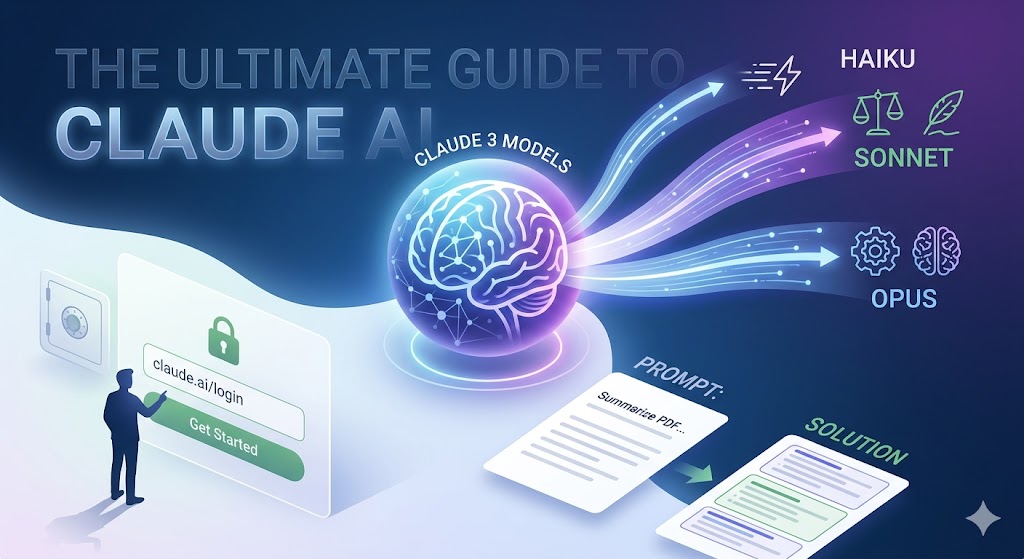
The landscape of artificial intelligence is fundamentally changing how we search for information, especially as marketers learn to navigate Google’s new AI overviews. Amidst the rapid release of new large language models (LLMs), one platform has consistently stood out for its nuance, safety, and human-like conversational abilities: Claude.
Developed by Anthropic—an AI safety and research company founded by former OpenAI researchers—Claude represents a significant leap forward in natural language processing. Whether you are a software developer looking to debug complex code, a content marketer needing to draft long-form SEO articles, or a researcher looking to summarize hundreds of pages of PDF documents, Claude is designed to be a helpful, harmless, and honest assistant.
Navigating to the Claude login is the first step toward unlocking a massive leap in personal and professional productivity. However, to truly harness the power of this AI, you need to understand its underlying architecture, its unique model family (Haiku, Sonnet, and Opus), and the best practices for prompting it effectively.
This comprehensive guide will walk you through everything you need to know about Claude. We will cover how to seamlessly access the platform via https://claude.ai/login, troubleshoot common access issues, explore its standout features, and provide actionable use cases to integrate this powerful tool into your daily workflow.
What is Claude AI?
At its core, Claude is an advanced AI assistant capable of performing a wide variety of cognitive tasks. But to understand what makes Claude different from other chatbots on the market, you have to look at the company behind it. Anthropic was founded with a singular mission: to build reliable, interpretable, and steerable AI systems.
Unlike other models that can sometimes prioritize compliance over accuracy (leading to “hallucinations” or made-up facts), Claude was built to prioritize safety and truthfulness. It is designed to be an enterprise-ready tool just as much as it is a consumer application. When you interact with Claude, you will immediately notice a distinct tone—one that is highly articulate, surprisingly nuanced, and less prone to the robotic, repetitive phrasing often associated with AI-generated text.
The Power of Constitutional AI
The secret sauce behind Claude’s unique personality and safety parameters is a framework developed by Anthropic called “Constitutional AI.” Traditional AI models are primarily trained using Reinforcement Learning from Human Feedback (RLHF), where human testers rate the AI’s responses to teach it what is good and bad. While effective, this process is slow, expensive, and subject to human bias.
Constitutional AI takes a different approach. Anthropic provided the AI with a “constitution”—a set of rules and principles drawn from sources like the UN Declaration of Human Rights and other ethical guidelines. The AI is then trained to critique its own responses and revise them to ensure they align with this constitution.
This means that when you use Claude, you are interacting with a model that has been structurally designed to avoid toxic, biased, or harmful outputs, making it incredibly safe for corporate environments, educational institutions, and public-facing applications.
Navigating the Claude Login: How to Access the Platform

Getting started with Claude is a straightforward process, though there are a few nuances depending on your region and intended use case. Anthropic has designed the onboarding process to be frictionless, allowing you to go from creating an account to generating text in just a few minutes.
Step-by-Step Guide to Accessing Claude
- Visit the Official Login Page: Open your preferred web browser and navigate directly to the official portal at
https://claude.ai/login. Ensure you are on the correct domain to avoid phishing scams. - Choose Your Authentication Method: Anthropic offers a passwordless login system to enhance security. You have two primary options:
- Continue with Google: If you have a Google workspace or personal Gmail account, this is the fastest method. It uses Single Sign-On (SSO) to instantly authenticate your identity.
- Use an Email Address: If you prefer not to link your Google account, you can enter any valid email address.
- Verify Your Email: If you chose the email route, Anthropic will send a temporary login code to your inbox. Retrieve this code and enter it on the login screen.
- Phone Verification (For New Users): To prevent spam and abuse, Anthropic currently requires new users to verify their accounts using a valid mobile phone number. Enter your number, and you will receive an SMS with a verification code.
- Set Up Your Profile: Once verified, you will be asked to provide your full name and agree to the platform’s terms of service and acceptable use policy.
- Start Chatting: You will instantly be redirected to the main chat interface, where you can begin your first conversation with Claude.
Troubleshooting Common Claude Login Issues
While the process is generally smooth, you might encounter occasional hiccups. Here are actionable solutions to common login problems:
- “Claude is not available in your region” Error: Anthropic has been rolling out access globally, but there are still certain countries where Claude is not officially supported. If you encounter this error, check Anthropic’s official documentation for the updated list of supported regions.
- Not Receiving the Login Code: If you opted for the email login and haven’t received your code, check your spam or promotional folders. Ensure you typed your email correctly. If the issue persists, try using the “Continue with Google” option instead.
- Phone Verification Fails: Anthropic blocks certain VoIP numbers (like Google Voice) from being used for verification to prevent bot accounts. Ensure you are using a standard, carrier-provided mobile number.
- Browser Caching Issues: If the login page loops or fails to load the chat interface after entering your code, clear your browser’s cache and cookies, or try logging in using an Incognito/Private window.
Exploring the Claude 3 Model Family
In early 2024, Anthropic revolutionized the AI space by releasing the Claude 3 model family. Rather than offering a one-size-fits-all solution, Anthropic tiered their technology into three distinct models, allowing users to choose the right balance of intelligence, speed, and cost for their specific needs.
1. Claude 3 Haiku: The Speed Demon
Haiku is the fastest and most compact model in the Claude 3 family. It is engineered for near-instant responsiveness. Haiku is incredibly adept at reading dense information and returning answers in fractions of a second.
- Best used for: Real-time customer service chatbots, quick data extraction from unformatted text, content moderation, and tasks where speed and cost-efficiency are the highest priorities.
2. Claude 3 Sonnet: The Balanced Workhorse
Sonnet is the ideal balance between high-level intelligence and rapid processing. For the vast majority of users who log into the free tier at https://claude.ai/login, Sonnet is the default model powering the experience. It is highly capable, extremely articulate, and perfect for everyday cognitive tasks.
- Best used for: SEO blog writing, summarizing long articles, drafting emails, analyzing moderate amounts of data, and general-purpose coding.
3. Claude 3 Opus: The Heavyweight Thinker
Opus is Anthropic’s most powerful, flagship model. It boasts near-human levels of comprehension and fluency on highly complex tasks. Opus is designed to handle intricate logic, advanced mathematics, and deep-level coding architectures.
- Best used for: Complex software development, deep financial forecasting, advanced strategic planning, writing complex novels, and scenarios where maximum accuracy and reasoning are required.
Key Features That Set Claude Apart
Once you complete the Claude login and start experimenting with the platform, you will quickly discover several features that give it a distinct edge over other AI tools on the market.
The Massive Context Window
Perhaps the most defining feature of Claude is its massive context window. The context window is the amount of text (measured in tokens) that the AI can “remember” and process in a single conversation.
The Claude 3 models boast a massive 200,000-token context window. To put that into perspective, 200,000 tokens is roughly equivalent to 150,000 words, or a 500-page book. This means you can upload entire legal depositions, multiple financial reports, or the entire codebase of an application directly into the chat prompt. Claude can then read, analyze, and cross-reference all of that data simultaneously, without losing the thread or forgetting information from the beginning of the document.
Advanced Vision Capabilities
Unlike earlier iterations of Claude which were strictly text-based, the Claude 3 family is multimodal. This means Claude can see and interpret visual data. You can upload photos, charts, graphs, technical diagrams, and even handwritten notes.
- Actionable use case: You can take a photograph of a whiteboard brainstorming session, upload it to Claude, and ask it to transcribe the notes, organize them into a structured project plan, and draft a follow-up email to your team.
Superior Coding and Logic Execution
Claude has been highly optimized for coding. Whether you are a beginner writing your first Python script or a senior developer debugging a complex React application, Claude excels at understanding logic. It doesn’t just provide code snippets; it explains why the code works, highlights potential security vulnerabilities, and suggests more efficient ways to structure your architecture.
Nuanced Content Creation
For digital marketers, SEO specialists, and copywriters, Claude is a revelation. Many AI models struggle with tone, producing text that sounds overly formal, repetitive, or distinctly “AI-generated” (often overusing words like “delve,” “tapestry,” or “testament”). Claude is remarkably adept at mimicking specific brand voices, following complex formatting instructions, and producing highly readable, engaging, and human-sounding content.
Practical Use Cases for Claude AI
Understanding Claude’s features is one thing, but applying them to real-world scenarios is where the true value lies. Here are several actionable ways you can integrate Claude into your daily operations.
1. Mastering SEO Content and Copywriting
Creating high-ranking content requires more than just keyword stuffing; it requires intent matching, readability, and knowing exactly how to optimize your SEO with AI.
- The Strategy: Instead of just asking Claude to “write an article,” provide it with a detailed outline, your target keyword list, and a sample of your writing style. Ask Claude to act as a Senior SEO Strategist.
- The Result: Claude can generate long-form guides (like this very article structure), complete with optimized H2 and H3 tags, engaging meta descriptions, and naturally integrated keywords, saving you hours of drafting time.
2. Rapid Data Analysis and Document Summarization
Professionals in law, finance, and academia spend countless hours reading dense documentation. Claude’s 200K context window solves this bottleneck.
- The Strategy: Upload multiple PDF files—such as a competitor’s annual report and your own company’s financials—directly into the chat interface.
- The Result: Ask Claude to compare the two documents, extract key performance indicators (KPIs), and present the findings in a structured markdown table. What would take a human two days of reading takes Claude twenty seconds.
3. Streamlining Software Development
Developers can use Claude as a highly intelligent pair-programmer.
- The Strategy: If you are stuck on a bug, copy and paste the error log along with the relevant code block into Claude.
- The Result: Claude will not only identify the syntax error or logic flaw but will rewrite the code cleanly and explain the underlying issue so you learn from the mistake. You can also upload UI/UX mockups and ask Claude to generate the frontend HTML/CSS for the design.
4. Enhancing Customer Support Workflows
For businesses looking to scale their customer experience, Claude’s predictable and safe output makes it ideal for handling inquiries.
- The Strategy: Upload your company’s entire FAQ document, return policy, and brand guidelines into the prompt.
- The Result: You can simulate customer service scenarios, asking Claude to draft empathetic, accurate, and on-brand responses to angry customers or complex technical support tickets.
Claude vs. The Competition: Which is Right for You?
With the AI market booming, a common question is how Claude stacks up against other leading models like OpenAI’s ChatGPT or Google’s Gemini. While all are powerful, they have different strengths.
- Tone and Writing Style: Claude is widely considered the superior model for creative writing, copywriting, and nuanced communication. It tends to sound much more natural and less formulaic than its competitors.
- Context Retention: While competitors have expanded their context windows, Claude’s 200K token limit and its incredible “needle-in-a-haystack” recall ability (its ability to find one specific fact hidden in 500 pages of text) remain industry-leading.
- Safety and Compliance: Due to its Constitutional AI architecture, Claude is significantly less likely to output harmful content or deviate from a given persona, making it a safer bet for enterprise deployment.
- Ecosystem Integration: Competitors often have robust ecosystems (like plugins or integrations with Google Workspace). Claude operates primarily as a standalone chatbot via its web interface and API, focusing purely on the quality of the core model rather than external bells and whistles.
Pricing Options: Free Tier vs. Claude Pro
Anthropic offers flexible access options to suit both casual users and heavy power users.
The Free Tier
Anyone can create an account via https://claude.ai/login and access the free tier. This tier gives you access to the highly capable Claude 3 Sonnet model. You can upload files, use the vision capabilities, and enjoy the large context window. However, the free tier is subject to dynamic usage limits. During periods of high global traffic, you may hit a message cap and be asked to wait a few hours before continuing.
Claude Pro
For professionals who rely heavily on AI for their daily workflows, Anthropic offers Claude Pro for a monthly subscription fee (typically around $20 USD/month).
- Priority Access: Pro users experience significantly higher usage limits, meaning fewer interruptions during deep-work sessions.
- Access to Opus: Most importantly, a Pro subscription unlocks access to Claude 3 Opus, the smartest and most reasoning-capable model in the lineup.
- Early Access: Pro users frequently get early access to new features, UI updates, and experimental tools launched by Anthropic.
Advanced Best Practices: Prompt Engineering for Claude
To get the most actionable value out of Claude, you need to master prompt engineering. How you ask the question directly dictates the quality of the answer. Here are advanced strategies specifically tailored for Claude:
1. Assign a Persona
Always start by telling Claude “who” it should be. This sets the tone and context for the entire response.
- Example: “Act as a Senior Python Developer with 10 years of experience in cybersecurity. Review the following code for vulnerabilities…”
2. Use XML Tags for Structure
Claude has been highly trained to understand and follow XML tags. This is a game-changer for complex prompts where you need to separate instructions from the raw data.
- Example: “Please summarize the text enclosed in the
<article>tags. Follow the specific formatting rules outlined in the<instructions>tags.”
3. Provide Few-Shot Examples
If you want Claude to write in a highly specific format or brand voice, give it examples of what “good” looks like.
- Example: “Write a product description for a new coffee mug. Here are three examples of our brand’s previous product descriptions to mimic the tone…”
4. Give Claude Room to Think
For complex logic or math problems, tell Claude to think through the problem step-by-step before providing the final answer. You can even use XML tags for this.
- Example: “Before you answer, please use the
<scratchpad>tags to break down your logical reasoning step-by-step. Then provide the final answer.”
5. Be Clear and Direct
You do not need to use polite conversational filler (like “please” or “thank you”). Be concise. Tell Claude exactly what you want, the format you want it in, and what it should avoid doing.
Conclusion: Embracing the AI Revolution
The rapid advancement of conversational AI is reshaping the modern workflow. By mastering tools like Claude, you position yourself at the forefront of this technological shift, unlocking entirely new levels of efficiency, creativity, and problem-solving.
From its secure Constitutional AI foundation to its massive context window and nuanced natural language capabilities, Claude represents a mature, enterprise-ready assistant that can handle almost any cognitive task you throw at it.
The barrier to entry has never been lower. By simply navigating to https://claude.ai/login, setting up an account, and applying the prompt engineering best practices outlined in this guide, you can begin transforming how you work today. Whether you are building complex software architectures, analyzing dense financial reports, or crafting highly optimized SEO articles, Claude is ready to assist. Take the time to experiment with Haiku, Sonnet, and Opus, find the workflows that suit your needs, and watch your productivity soar.
Related articles :
- How to Optimize Your SEO with AI?
- AI-Generated Video for Marketing in 2026: Tools, Examples & Tips
- The Differential Effects of AI on Human Decisions
- 20 Best AI Shopping Tools to Save Money in 2026 (Full Guide)